Modify Pipeline Parameters at Query Time
You can override component parameters set in the pipeline configuration for a specific query. This helps you test different settings without changing the pipeline file.
Parameters You Can Modify
At query time, you can modify the run() method parameters of the components in your pipeline. To check the parameters you can change for a specific component:
- Go to the component documentation.
- Scroll down to the Run Method Parameter section. These are the parameters you can modify at query time.
For example, forDeepsetAnswerBuilder, you can find the parameters in the Run Method Parameters section of the documentation.
You can't modify component connections at query time.
Parameter Format
Pass parameters as a JSON dictionary using the following format:
{
   "component1_name":{ // this is the name you gave to your component in your pipeline
      "parameter1_name":"parameter1_value",
      "parameter2_name":"parameter2_value"
   },
   "component2_name":{
      "parameter3_name":"parameter3_value"
   }
}
For example, to change the Retriever's top_k parameter for a specific query, use this code:
{
  "retriever":{"top_k":5}
}
The component names must match those defined in your pipeline. The parameters you set must be valid run() method parameters for the corresponding components.
Passing Parameters
You can modify parameter values at query time in these ways:
- Through the Search, Chat Stream, or Chat Completions API endpoints. For details, see Pass Runtime Parameters.
- In Playground
- In a query set for a job
- On a shared prototype page
- In Prompt Explorer
Passing Parameters in Playground, Shared Prototype, and Prompt Explorer
When testing your pipeline in the Haystack Platform Playground, you can set runtime parameters in the Configurations window. This is the fastest and easiest way to see how different settings affect pipeline results.
To update parameters:
- In Haystack Enterprise Platform, go to Playground, Prompt Explorer, or open the shared prototype link.
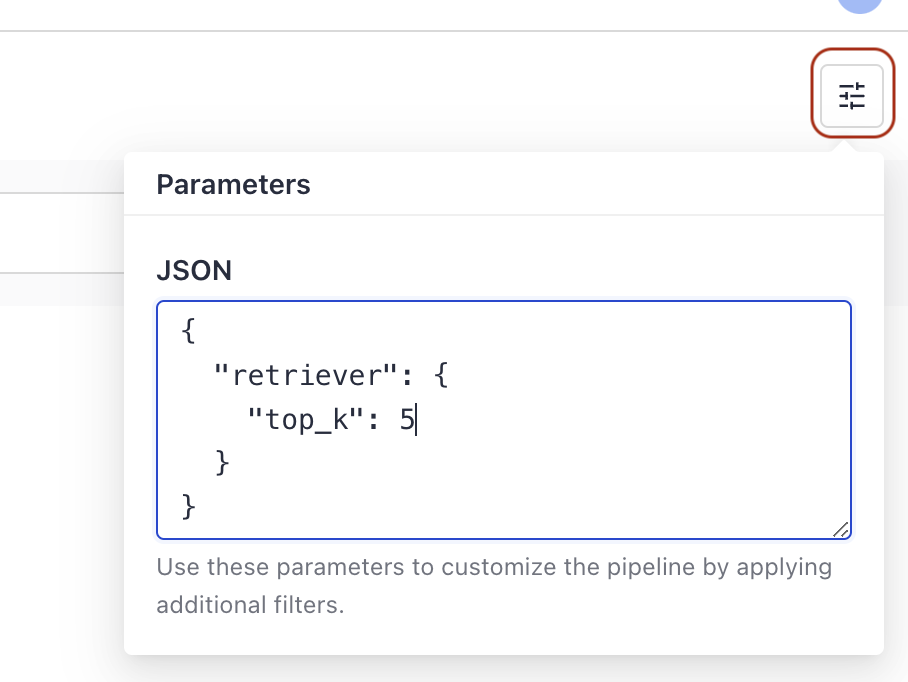
- If applicable, choose the pipeline you want to test and click the Configurations button in the top right corner.
- In the Configurations window, enter the components and parameters you want to update as a JSON dictionary using this format:
{ "component_name": { "parameter1_name": "parameter1_value" }}:
- Type your query and run the search.
To compare results, run another search without modifying the parameters.
Passing Parameters in a Query Set
When creating a query set for a job, list the components and parameters you want to change in the params column.
For details and examples, see Example query set with parameters.
Was this page helpful?